Architecture
SimDB is a command line client plus an optional shared server. This page describes how the pieces fit together and how data moves between them. For the user-facing concepts (simulation, manifest, metadata, and so on), see Concepts.
Two components
SimDB has two major components: one local to the user and one remote.
The local component is a command line tool, similar in spirit to tools like
git. Commands are organised as a tree, each level with its own--help.The remote component manages the shared reference database and its metadata.
The two communicate through a REST API over SSL-encrypted HTTP. Interactions are stateless, do not assume a permanent connection, are keyed on a simulation’s UUID, and require authentication on each request. See the REST API reference.
Component overview
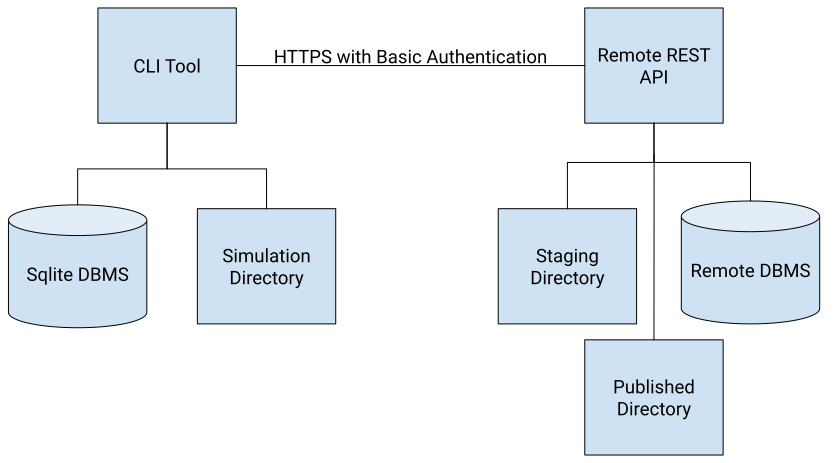
CLI tool: manages simulation metadata, the file manifest, and provenance, and lets the user query these locally and on remotes.
Local SQLite database: stores the user’s ingested simulations before they are pushed to a remote.
Simulation directory: where a simulation was run and where its files are read from when pushing.
Remote REST API: receives pushed simulations and stores them for validation and publishing.
Staging directory: where pushed files are placed while awaiting validation, named by the simulation UUID, then moved to permanent storage once committed.
Remote database: stores metadata, provenance, and validation status for every uploaded simulation (PostgreSQL in production, optionally SQLite).
Supported platforms
SimDB runs on Linux, macOS, and Windows.
Data flow
Ingest
The user writes a manifest and runs
simdb simulation ingest. SimDB resolves each input and output URI, computes
checksums, and records the simulation and its files in the local SQLite
catalogue.
Push
simdb simulation push transfers the simulation to a server. The metadata is
sent as a structured payload, and each referenced file is streamed over HTTP
(compressed in transit). For IMAS URIs, SimDB discovers the underlying files
from the backend; local IMAS URIs are rewritten to remote URIs using the
server’s imas_remote_host/imas_remote_port settings so the data stays
reachable. Files land in the staging directory, are checksummed, validated, and
then committed to permanent storage.
Pull
simdb simulation pull is the mirror of push: it copies a simulation’s metadata
from the server into the local catalogue and downloads its data files into a
directory you choose.
Server stack
In production the server runs as a WSGI application (the simdb_server entry
point) behind a dedicated web server such as Nginx, with Gunicorn as the WSGI
server, and PostgreSQL as the database. The schema is managed with
Alembic migrations. See
Operating a server.
Validation
The server can validate simulations on upload: integrity checks confirm that file checksums still match, metadata is checked against a Cerberus schema, and file contents can be checked by a file validator such as the IDS validator. See Validation.